Rust Building Skins (2026): Every Set, Its Tier, Price and How to Apply It
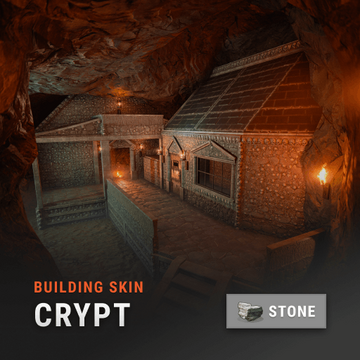
Rust has eight building skins and two external wall-and-gate packs, all sold in Facepunch's permanent store on Steam. The eight full sets cost $12.99 each, apart from Shipping Container at $13.99, and the two wall packs cost $9.99, as we read the Steam item store on 13 Oct 2026. Five of the eight are Stone-tier skins. There is one each for Wood, Sheet Metal and Armored, and none changes how much it takes to raid you. They're cosmetic, bound to your Steam account, and applied with the hammer.
Most pages ranking for this search are 2023 news posts about a single skin. This sheet puts the full set list in one place, with the tier each skin replaces, the month Facepunch released it and today's price, then covers how to apply and switch skins, what Facepunch has said about raid stats, and which set suits which base.
Every building skin
| Skin | Tier it replaces | Released | Price |
|---|---|---|---|
| Adobe | Stone | May 2023 | $12.99 |
| Shipping Container | Sheet Metal | June 2023 | $13.99 |
| Brick | Stone | August 2023 | $12.99 |
| Brutalist | Stone | October 2023 | $12.99 |
| Legacy Wood | Wood | December 2023 | $12.99 |
| Adobe Gate and Wall Pack | Stone external walls and gates | April 2025 | $9.99 |
| Jungle | Stone | May 2025 | $12.99 |
| Legacy Wood Gate and Wall Pack | Wood external walls and gates | July 2025 | $9.99 |
| Space Station | Armored | December 2025 | $12.99 |
| Crypt | Stone | May 2026 | $12.99 |
Buying everything comes to $124.90: $104.92 for the eight full sets and $19.98 for the two wall packs. The tier labels are Facepunch's own, from its store page; Steam's listing for each full set adds that owning it means "you'll be able to upgrade building parts to this tier."
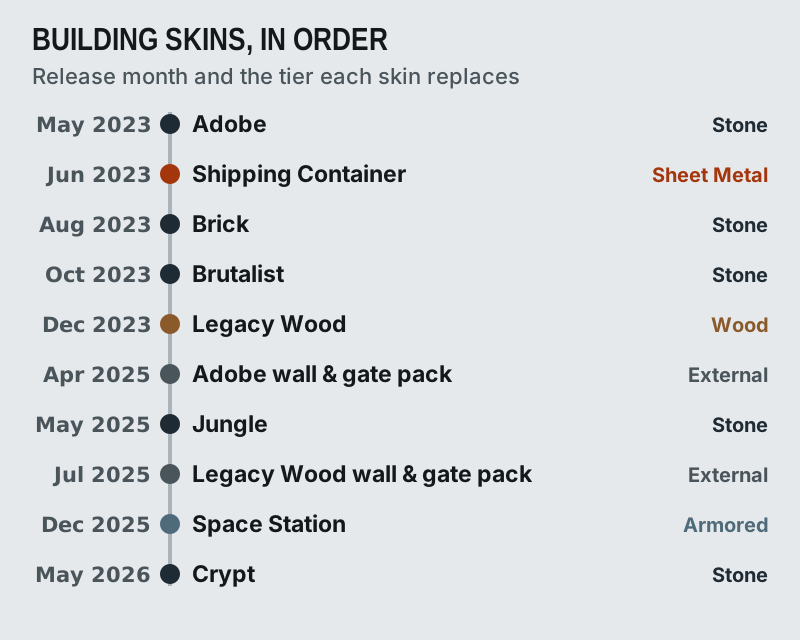
The pace tells you what to expect. Facepunch released five sets in the eight months from May to December 2023, then nothing new for the main tiers until Jungle in May 2025. Since then it has added roughly one building item every few months, alternating full sets with external wall-and-gate packs. Stone has had the most attention by far. Wood, Sheet Metal and Armored have one set each, so a Stone base has five looks to choose from and an Armored base has one.
How to apply and switch building skins
You apply a building skin with the Building Plan's partner, the hammer. Facepunch's instructions have been the same since the Adobe launch in May 2023: equip your hammer, open its radial wheel, and enable building skins. The wheel then shows the skins you own for each tier, and you upgrade a block to the skinned version as you would upgrade it normally. Since June 2023 you can also cycle between skins with Q and E while hovering over a tier button; the keys can be rebound in the options menu.
A few behaviours are worth knowing before you start:
- Ownership is checked against your Steam inventory, so a skin works on the servers you join, but only for the account that bought it.
- Switching a block to another skin doesn't repair it. Facepunch fixed a bug in June 2023 where switching skins fully repaired the block.
- Shipping Container blocks start in one of 16 random colours. The spray can's alternate fire, right mouse button by default, opens a colour wheel to repaint them, and new blocks use the last colour you sprayed.
- Since June 2025, wooden external walls and gates can be upgraded straight to the Adobe versions if you own the pack, without passing through regular stone first.
If a skin doesn't appear on the wheel, check that you're signed in to the Steam account that bought it and that the block is the right tier. A Stone skin never shows on a Wood or Sheet Metal block.
Do building skins change raid cost?
No, as far as anything Facepunch has published says. Its May 2023 post launching Adobe, the first building skin, stated that the skin "is equivalent to the stone building tier for stats." Every set since has been sold the same way, as a look for an existing tier: Facepunch's posts describe Brick, Brutalist, Jungle and Crypt as changing "the visuals" of a stone base, and Legacy Wood as changing the visuals of a wood base. We found no Facepunch note giving any skin different health, upkeep or raid cost.
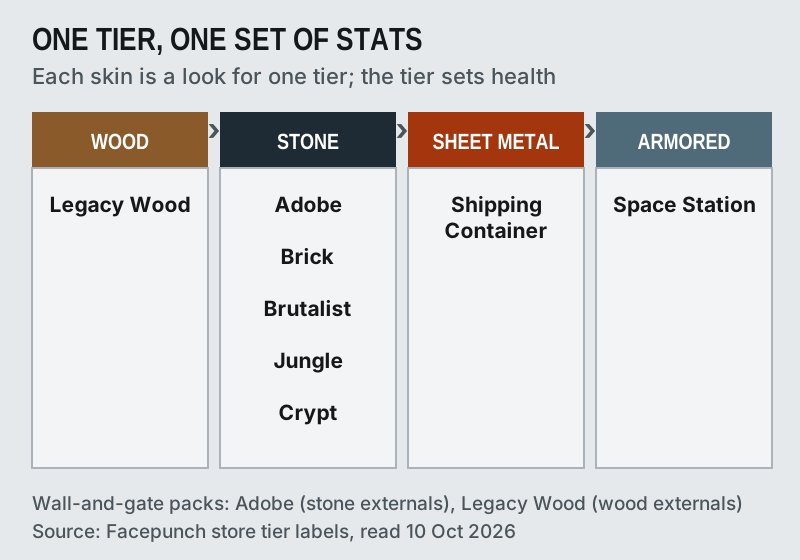
So the raid maths for a skinned base is the maths for its tier. A Crypt wall is a stone wall, and a Space Station wall is an armored wall. The practical question is the one the skin can't answer: whether your base stands out. We haven't tested visibility in play, so we make no claims about which sets draw more raids.
Which set for which base style
With stats equal, the choice is about the look you want. Facepunch's own descriptions are the best guide:
Adobe is "a smooth building material made of earth, rock, and various organic materials" and pairs with its own wall-and-gate pack, so a compound can match from the gate inward. Brick is "a strong, classic building material made of recycled brick and other masonry debris," the most conventional look in the list. Brutalist is "a strong, concrete building style similar to Stone but with a cold, harsh appearance," and the closest of the five to vanilla stone.
Jungle is "intricately carved stone blocks adorned with weather glyphs and sun motifs," and Crypt is "a strong carved stone building skin adorned with gothic features and bones." Both are the most decorated Stone options, and Crypt is the newest skin in the store. Legacy Wood is "a throwback to the earliest days of Rust," the first and only Wood skin, with a matching wall pack.
Shipping Container is the only Sheet Metal skin and the only one you can recolour; with 16 colours, it suits a team that wants its base to look like one. Space Station, "an armored metal construction made from salvaged space module parts," is the only skin for Armored blocks, the top tier, so it's the one to buy if your main base ends at Armored.
What building skins are not
They aren't Workshop skins, and they can't be traded or resold. Steam's listing for each full set says the item "will be permanently bound to your steam account." That puts them outside everything on our buy-and-sell sheet: no market price, no resale value and no way to buy one second-hand. They also aren't the door, box and garage skins that come and go in the weekly store; for those, see our best Rust door skins and the Rust item store explainer.
They do count for one thing. Facepunch's Premium Servers, launched in March 2025, require a Rust Steam inventory worth $15 or more, and Facepunch said that value includes Permanent Store items such as building skins. If you play there, a building skin counts toward that threshold.
Edge cases
Console is a separate game. Rust Console Edition, published and developed by Double Eleven, sells its own building skins through the PlayStation and Xbox stores. Its store page listed Space Station, Shipping Container, Brutalist, Legacy Wood, Brick and Adobe, plus both external packs, but not Jungle or Crypt when we checked on 10 Oct 2026. PC and console stores are separate, so check the platform before you buy.
Prices can change during sales. Facepunch cut every Steam Item Store DLC released before 2026 by 20% from 7 to 21 May 2026 to launch its Discord Shop, so watch for similar promotions if you're buying several sets. And a building skin changes only the blocks you upgrade with it: doors, windows and deployables keep their own skins, so a full look usually means combining a building set with Workshop door and box skins.
Questions off the sheet
How do you apply building skins in Rust?
Do building skins change raid cost or HP in Rust?
How much are Rust building skins?
Can you change the building skin after placing?
Can you trade or sell Rust building skins?
Check this against the whole wall: the where-to-buy-and-sell Rust skins sheet with every marketplace fee dated, or the best Rust skins by item.